Before requesting a smart lock with remote access, property managers should assign responsibility for five actions: unlocking, approving users, resetting administrators, revoking credentials, and reviewing access records. Each action needs a named role, a defined scope, an approval rule, and a handover procedure. The RFQ should also require model-specific evidence that the proposed lock and management platform can support those controls.
“Remote access” is not a complete specification. One supplier may interpret it as app-based user management near the door, while another may mean off-site unlocking through a connected system. A quotation can therefore appear compliant even though it does not match the property’s operating workflow. Procurement teams should define the permission model first, then ask suppliers to confirm which functions are available on the exact lock, app, gateway, or management configuration being quoted.
Start With Actions, Not Job Titles
A title such as “administrator” says little about what that person may actually do. A hotel duty manager may need to authorize a one-time unlock but should not necessarily be able to transfer system ownership. An apartment leasing team may create tenant access yet have no reason to change device settings. Maintenance personnel may need time-limited entry to assigned rooms without visibility into other occupants or properties.
The first RFQ attachment should be a responsibility matrix. The matrix below is a planning model, not a claim that every app-connected lock includes every listed function. Buyers should delete irrelevant rows and require the supplier to mark each remaining function as supported, unsupported, or dependent on an additional component.
| Remote Access Action |
Decision to Define Before the RFQ |
Typical Project Control |
Evidence to Request |
| Remote unlock |
Which roles may unlock which rooms, and under what circumstances? |
Limit access by property, building, floor, room, shift, or incident type. |
Role-permission screen, operating instructions, and a sample acceptance test. |
| Unlock approval |
Can one person act alone, or must another role approve the request? |
Use a second approval for sensitive rooms or after-hours exceptions where the project requires it. |
Supplier confirmation of the available approval workflow on the quoted configuration. |
| User or credential creation |
Who may add staff, guests, tenants, contractors, or temporary users? |
Separate routine room access from administrator creation. |
Demonstration of user roles, validity periods, and room assignment controls. |
| Credential revocation |
Who removes access after checkout, lease termination, staff departure, or a lost phone? |
Assign a response owner and a required completion point for each event. |
Revocation procedure and proof that access removal can be checked at the affected lock. |
| Administrator reset |
Who may reset a lock or account, and who authorizes that action? |
Keep reset authority narrower than routine user-management authority. |
Model-specific reset instructions and a post-reset recommissioning checklist. |
| Access record review |
Which roles may view or export records, for which doors, and for what operating purpose? |
Restrict visibility to the smallest operational scope required by the project. |
Supplier confirmation of record fields, availability, retention controls, and export options. |
| System ownership transfer |
Who receives control after installation, and how are installer privileges removed? |
Make final ownership transfer a documented acceptance milestone. |
Handover procedure showing account transfer, credential removal, and buyer verification. |
Define Permission Scope at Door and Portfolio Level
A permission is only useful when its scope is clear. “Property manager can unlock doors” could mean one assigned apartment, every room in one building, or an entire portfolio. That difference affects operational risk and should not be left for the installer to decide during commissioning.
For each role, specify the permitted properties, buildings, floors, rooms, and time windows. Also state whether the role can delegate access to another person. If delegation is allowed, define who can approve it and when it expires. A regional administrator may need visibility across several sites, while an on-site manager may only need authority for one location. Centralizing every permission can simplify oversight, but it also creates a wider impact if one account is mishandled. Purely local control narrows that impact but may slow support when no authorized person is on site.
The same scope logic should apply to property changes. When a room changes from long-term rental to short-stay use, the required credential workflow may change even if the physical lock remains in place. Buyers reviewing smart lock options for managed properties should therefore compare the operating model as carefully as the handle, finish, or unlocking method.
Separate Routine Access From Exceptional Access
Routine access covers planned events such as guest arrival, tenant move-in, housekeeping, inspection, or scheduled maintenance. Exceptional access covers lockouts, welfare checks, damaged phones, network interruptions, staff absence, and other incidents that require a controlled deviation from the normal workflow.
The project specification should identify the exception owner, the evidence required before an unlock, and the record created afterward. It should also state what happens if the remote function is unavailable. Depending on the selected model, fallback may involve a password, fingerprint, card, mechanical key, local administrator, or another verified method. No fallback should be assumed across the full product range; Haolock’s product system includes several unlocking and management options, but the available combination must be confirmed by model.
This distinction prevents an everyday convenience feature from becoming an uncontrolled master-access route. It also gives the supplier a testable requirement: demonstrate the normal workflow, demonstrate the exception workflow, and show how the system returns to normal control after the incident.
Confirm the Exact Product and Management Configuration
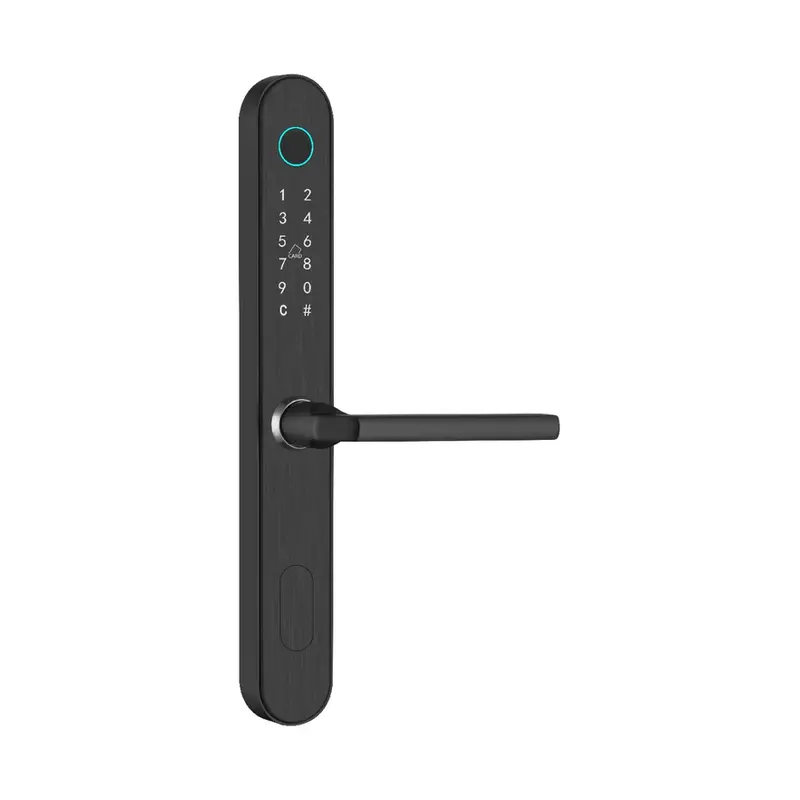
The physical lock and the remote-management arrangement should be approved as one configuration. The 1023 Black Password & Fingerprint Lock, for example, is listed for apartments, homes, rental rooms, homestays, and managed-access projects. Its documented product data confirms a black stainless-steel body, brushed finish, dimensions of 330 × 42 × 22 mm, and password and fingerprint identification.
Those facts do not, by themselves, establish remote unlocking, account hierarchy, gateway requirements, record availability, or app behavior. If a buyer wants this model—or any option from the fingerprint smart lock range—with remote management, the supplier should identify the exact variant and every supporting component in the quotation. The same rule applies when evaluating the password smart lock range: a keypad or temporary password function should not be treated as proof of off-site administration.
Ask the supplier to state whether each requested function is performed at the lock, through a phone near the lock, through a gateway, or through another management interface. This single clarification can expose hidden scope differences between quotations and prevent a sample configuration from being approved under assumptions that do not carry into the bulk order.
Make Handover and Revocation Part of Acceptance
Remote access governance often fails at transitions rather than during normal use. Installers leave, employees change roles, tenants move out, property operators change, or a phone linked to an administrator account is lost. The project needs a defined response for each event before installation begins.
Final acceptance should verify that the buyer controls the intended administrator account, unauthorized setup accounts have been removed, each role has the approved door scope, and a test credential can be created and revoked. If the project requires access records, the acceptance team should also verify that the intended reviewer can retrieve the required information while unrelated users cannot. Record retention and export behavior should be confirmed against the project’s own operational and legal requirements rather than assumed.
For multi-site projects, nominate both an account owner and a recovery contact. They should not be temporary installers or individual employees whose departure would leave the property without administrative control. A documented change process is also needed: any later permission expansion should identify who requested it, who approved it, which doors were affected, and when the change was tested.
What Should the RFQ Require the Supplier to Confirm?
| RFQ Input |
Information the Buyer Should Provide |
Supplier Response Required |
| Property and door schedule |
Number of sites, buildings, rooms, door types, door thicknesses, and required lock quantities. |
Compatible lock model, lock-body arrangement, and any door information still needed. |
| Permission matrix |
Roles, allowed actions, door scope, time scope, approval rules, and delegation limits. |
Supported functions, limitations, and any function that needs a different model or component. |
| Connectivity plan |
Where remote operation is required and what connectivity is available at each property. |
How the quoted configuration communicates and what additional device or setup is required. |
| Fallback procedure |
Who needs emergency access and which offline or local methods the project will accept. |
Available fallback methods on the exact model and the procedure for restoring normal control. |
| Handover package |
Named administrator owner, recovery contact, staff roles, training audience, and required documents. |
Setup instructions, reset procedure, ownership-transfer steps, and role-configuration records. |
| Acceptance test |
Sample doors, user roles, permitted actions, prohibited actions, and pass/fail criteria. |
Test method for the sample and the agreed verification approach for the delivered batch. |
A supplier response should distinguish standard functions from optional functions and identify dependencies. “App supported” is not sufficient if the RFQ asks who can remotely unlock, whether an approval step exists, how access is revoked, or how ownership transfers after commissioning. The quotation should answer those questions against the named model and configuration.
Questions Property Managers Commonly Ask
Should every property manager receive remote unlock permission?
No. Permission should follow operational responsibility, door scope, and incident procedures. Some managers may only need to issue or revoke credentials, while a smaller group handles exceptional remote unlocks.
Does app control always mean off-site remote unlocking?
No. “App control” can describe different connection and management arrangements. Buyers should ask the supplier to state where the user must be, how the lock communicates, and which additional components are required.
Can a product page prove that a lock supports the required permission hierarchy?
Not unless the page or supporting documents explicitly describe that hierarchy for the exact model. Product identity, material, dimensions, and unlocking methods do not automatically confirm account roles, approval rules, or record controls.
What is the most useful remote-access test before a bulk order?
Use a sample door and the property’s real role matrix. Test one permitted action, one prohibited action, credential revocation, administrator handover, and the agreed fallback method. Record the accepted configuration for comparison with the delivered batch.
Prepare a Permission Schedule Before Requesting a Quote
A workable RFQ combines the door schedule with the responsibility matrix. Include the property type, room count, door and lock-body information, preferred unlocking methods, remote actions, administrator ownership, fallback method, handover documents, and acceptance criteria. This gives the supplier enough context to match a model and identify unsupported assumptions before pricing.
Haolock can support model and configuration discussions for password, fingerprint, card, mechanical-key, temporary-password, Bluetooth, app, and computer-managed options, subject to the specific model. Property teams can submit the completed schedule through the smart lock project inquiry page so the quotation can address door compatibility and the required access-management workflow together.